
Writing assist
When you don't know how to finish the sentence
Some sentences start fine and then run out of road. Open the writing bar at the bottom of the page, and it offers a few ways to carry the thought forward, in the language you're learning — pick the one that sounds like you, or ignore all three and keep going yourself.
When the sentence runs out of road
Some days the trouble isn't starting — it's the middle of a sentence that's wandered somewhere you didn't expect and now won't finish itself. Rather than staring at it, open the writing bar and ask for a few ways to carry the thought forward, still in the language you're learning. Pick one, tweak it, or ignore all three and find your own way out. It's there for the stuck moment, not for writing the page instead of you.
Two doorways, one bar
The same tool lives in two places: on the standalone writing page, and inside the journal's note dialog, for the longer notes people write there. Whichever one you're in, a pin in the toolbar opens the same bar at the bottom of the screen.
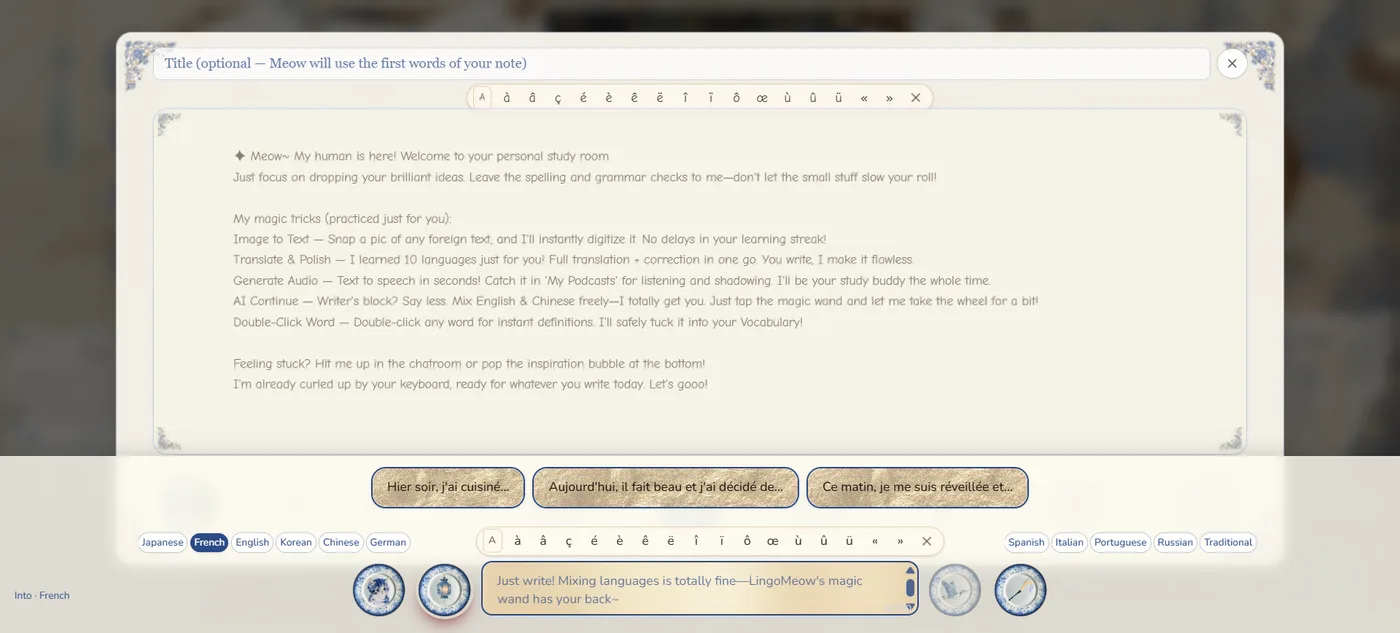
Not the wand, a different tool
It's easy to mix this up with the magic wand, so it's worth being clear: the wand takes what you've written and rewrites it properly. This one doesn't touch what's already on the page — it only offers a few ways forward from where you stopped. Different job, different tool, and neither one uses up the other's allowance.
A Pro feature
This one isn't on the free plan. The journal, the chat, the wand, shadowing, the vocabulary drawer — all of that works the same either way. This particular bar is part of Pro and Max.
Also in the same book
Everything you write with a hand from this bar becomes an ordinary page afterward — decorate it, translate it further, or turn a line from it into something to shadow.
Live it, don't just learn it.
Start for free Free plan, no card needed. A language journal for people who love life.Questions people ask
What does this actually do?
It reads what you've already written on the page and suggests a few ways to continue the thought, in the language you're learning. Tap one and it's added to your note. It's a nudge, not a ghostwriter — you're still the one who started the sentence.
Where do I find it?
A pin in the writing toolbar opens it — on the standalone writing page, and inside the journal's note dialog, for whichever one you happen to be writing in. Same bar, two doorways.
Is this the same as the magic wand?
No. The wand rewrites what you've already written; this offers a few ways to keep writing when you've stalled. They're separate tools with separate allowances.
Is it free?
This particular tool is a Pro and Max feature. Everything else on the free plan — the journal, the chat, the wand, the vocabulary — works as usual without it.